Go to CRM → Reports to see who owes you and for how long, what came in over the last 30 days, 90 days or 12 months, and what processing cost you. Further down are equipment sales by manufacturer, how long each task really takes against your book, and your membership book. Reports are for the office: Admin and Sales see them; techs don't.
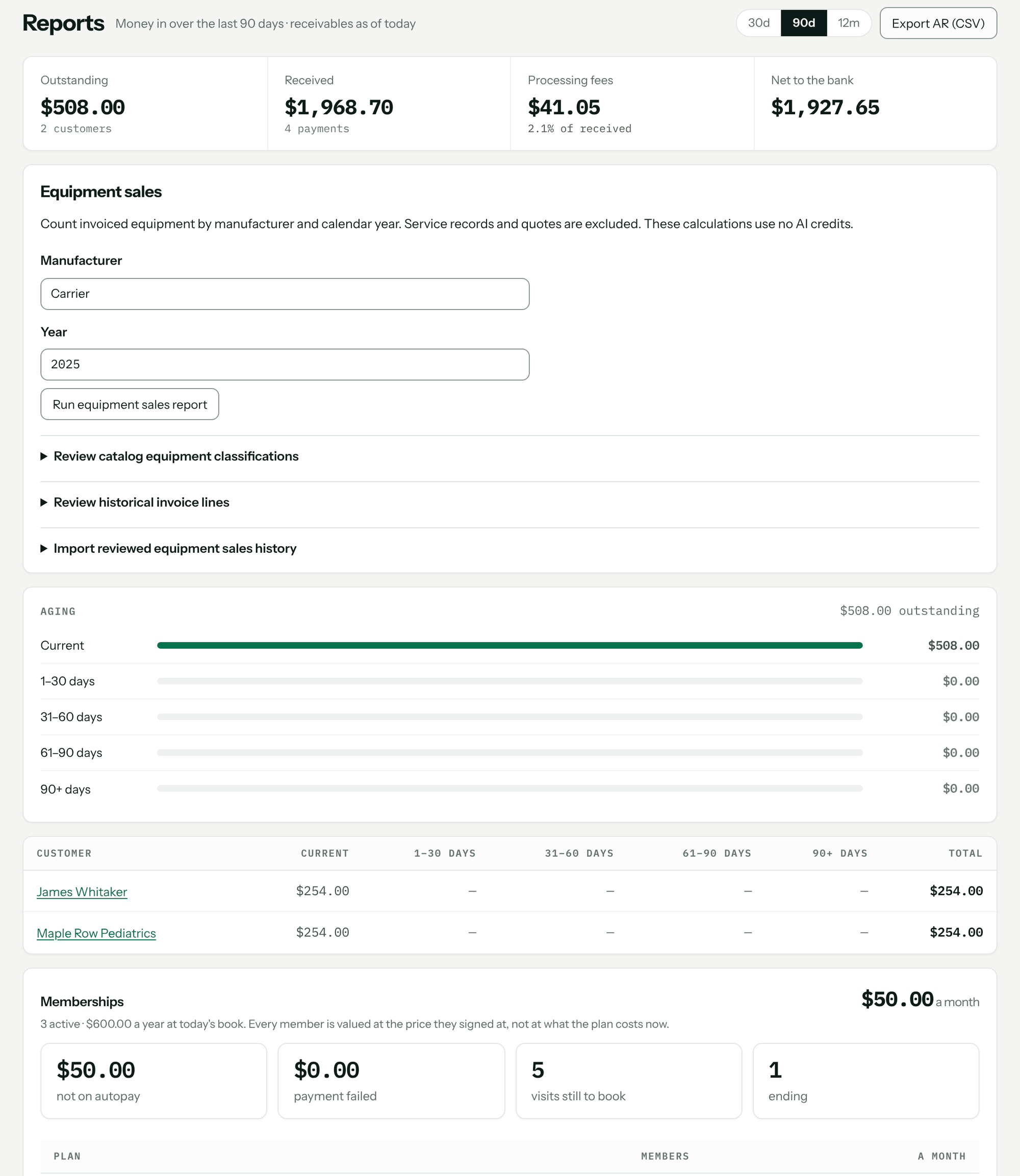
The totals across the top
Choose the period with 30d, 90d or 12m. The money-in figures follow the period; what's owed is always as of today.
| Tile | What it shows |
|---|---|
| Outstanding | Unpaid balance on issued invoices today, and how many customers owe it. |
| Received | Payments received in the period, and how many. |
| Processing fees | Stripe's fee plus Pricebookr's fee on those payments, and the percent of what you received. |
| Net to the bank | Received less fees. |
Aging: who owes you, and how long
The Aging panel splits what's outstanding into Current, 1–30 days, 31–60 days, 61–90 days and 90+ days. Underneath, each customer who owes you is listed with their balance in each column and how old their oldest invoice is. The oldest debt leads, because a small invoice ninety days late is the one that needs a phone call.
- Click a customer's row to list their open invoices: number, how many days late (or not yet due), what's been paid, and the balance. Click an invoice to open it.
- Click the customer's name to open their record.
- Export AR (CSV) downloads the same list as a spreadsheet. It's greyed out when nothing is outstanding.
If nothing is owed, the panel says either Nothing outstanding — all … settled or No issued invoices yet. Draft invoices aren't counted until they're issued — see Create, issue and send invoices.
Money in by method
A table of the period's payments by method — card, bank transfer, cash, check and others — with Payments, Received, Fees and Net, plus an All row. Hover over a fee to see Stripe's part and Pricebookr's part. Cash and checks you record carry no fee. An asterisk means Stripe's fee on some payments isn't known yet; it's filled in when the payout carrying them arrives, and until then the fee total is low. See Collect payments, record cash and checks, refunds, payouts.
Equipment sales
Counts invoiced equipment by manufacturer and calendar year — useful for a distributor rebate or a dealer program. Enter the Manufacturer and Year and click Run equipment sales report. You get the unit count by equipment type and the supporting invoices. Service records and quotes are excluded. Under the report you can review how catalog items and past invoice lines are classified as equipment.
Book vs clock
How long each flat-rate task actually takes against the hours in your book, worst overrun first. Only finished jobs with a single task count, so the hours aren't split by guesswork. A task with only one job behind it is marked one job so far. This panel shows only to people who can see costs — admins always, and others when cost visibility is turned on for them under Members — and only once there are jobs to read. See Build flat-rate tasks for quoting.
Memberships
Shown once you have active members (memberships are on the Pro plan). It gives your monthly recurring total, the yearly figure, and four counts: not on autopay, payment failed, visits still to book and ending. Below that, members and monthly value by plan, and first-year retention once memberships have reached their first anniversary. See Recurring maintenance visits and memberships.
What it doesn't do
- It doesn't show draft invoices, quotes or jobs not yet invoiced as money owed.
- The aging list reads the oldest 2,000 open invoices. Past that, it says so, and the total and export are low.
- It doesn't calculate finance charges or sales tax owed. For your books, connect QuickBooks: Connect QuickBooks Online.
Troubleshooting
| You see | Why | Fix |
|---|---|---|
| Couldn't load your reports. | The report didn't arrive — usually a dropped connection. Nothing has been lost. | Click Try again. |
| … is an office screen | You're signed in with the Field role. | Ask the office for the figures, or to change your role. |
| Showing the oldest 2,000 open invoices. … | You have more than 2,000 open invoices. | Work the oldest down; the total is low until you do. |
| History unavailable; this is not proof of zero sales. | The equipment sales report couldn't read invoice history for that year. | Don't treat it as zero. Run it again later. |
| No Book vs clock panel | You can't see costs, or there are no finished single-task jobs yet. | Ask an admin about cost visibility, and record task lines and clock time on jobs. |
Questions: [email protected].