You can connect an AI assistant — Claude, ChatGPT, or anything else that supports custom connectors — to your Pricebookr account, and then work your price book by asking. What do we charge for a 45/5 capacitor? Ferguson put our costs up 6% — what would that do to our prices? Publish the new prices to Jobber. The assistant works inside your own account, sees exactly what you see, and shows you every price change before it happens.
This is a connection, not a copy. Your catalog is not uploaded anywhere or kept by anybody else — the assistant asks Pricebookr a question when you ask it one, and gets that answer back.
What you need
- An admin account. Connecting an app is an admin's decision. A sales or field user who tries is told so and asked to get an admin to set it up: the connection acts as whoever authorized it, and access to a price book is not something to hand over sideways.
- An assistant that supports custom connectors. Claude and ChatGPT both do. Where the setting lives differs between them and moves around, so look in your assistant's own settings for connectors or MCP servers.
- A paid plan, but only to publish to Jobber. Everything else — searching, pricing, adding items, previewing and applying price changes — works on the 14-day trial.
Connect it
- In your assistant, add a connector and give it this address:
https://www.pricebookr.com/mcp - Choose the option that signs in. This is the step to get right. A connector can be added with no sign-in at all, and one added that way can only offer to start a new Pricebookr account — it will never see the catalog you already have. Your assistant may word the choice as signing in, authenticating, or OAuth; pick that one rather than adding it without credentials.
- Your browser opens Pricebookr. Sign in if you aren't already.
- Pricebookr shows what the app is asking to be allowed to do. If you're an admin of more than one company, choose which one this connection is for. Then Allow.
- You land back in your assistant, connected.
The app is never given your password, and the connection covers the one company you chose. If you run two shops in Pricebookr and want both, connect twice.
What you're approving
The approval screen lists what the app asked for. There are three permissions, and an app may ask for any combination of them:
| Permission | What it allows |
|---|---|
| Read your price book | See items, costs, prices and your markup schedule. |
| Change your price book | Create and edit items, and apply price changes you have reviewed. |
| Publish prices to Jobber | Send approved price changes to your connected Jobber account. |
A connection can never do more than you can. It acts as your membership, so it has your role and your pricebook access — and if your role can't see cost, neither can the assistant, including the markup percentages that would give cost away. See Pricebooks & role-based access.
What it can't reach
Billing, team members, payouts and account settings are deliberately left to a person in the web app, and an assistant that tries one of them is refused with a sentence saying so. Your customers, jobs and quotes are out of reach too.
The rule runs the way round that stays safe as Pricebookr grows: an assistant can reach the short list of things published as tools, and everything else is refused — including every feature added after your connection was made. A new part of the app is out of reach on the day it is written, and becomes reachable only if somebody decides it should be.
A price change is shown before it happens
Ask for a price change and the assistant does not make it. It asks Pricebookr what the change would do, and comes back with the answer: how many items, which pricebooks, what each price is now and what it would become, and what it is leaving alone and why. Nothing has changed at this point.
You read that, and if it's right you tell the assistant to go ahead. What gets applied is the change you were shown — Pricebookr saved it when it did the arithmetic and applies that saved copy, so it cannot drift between the preview and your yes. If somebody edited one of those items in the web app in between, that row is skipped rather than overwritten, and the result says so.
Hand-set prices keep their protection. A change that would move items off their markup schedule says so in the preview and counts them, exactly as bulk editing does in the web app.
Publishing to Jobber
Sending prices to Jobber is its own permission and its own step, because a write to Jobber cannot be undone from Pricebookr. The assistant shows what would be sent, item by item, and sends only what you approved. See Push your prices to Jobber.
See what it's done, and end it
Open Settings and find the AI connections card. It lists every app connected to your company, what each one is allowed to do, when it was last used, and — behind Show recent activity — the last things it actually did, in plain language.
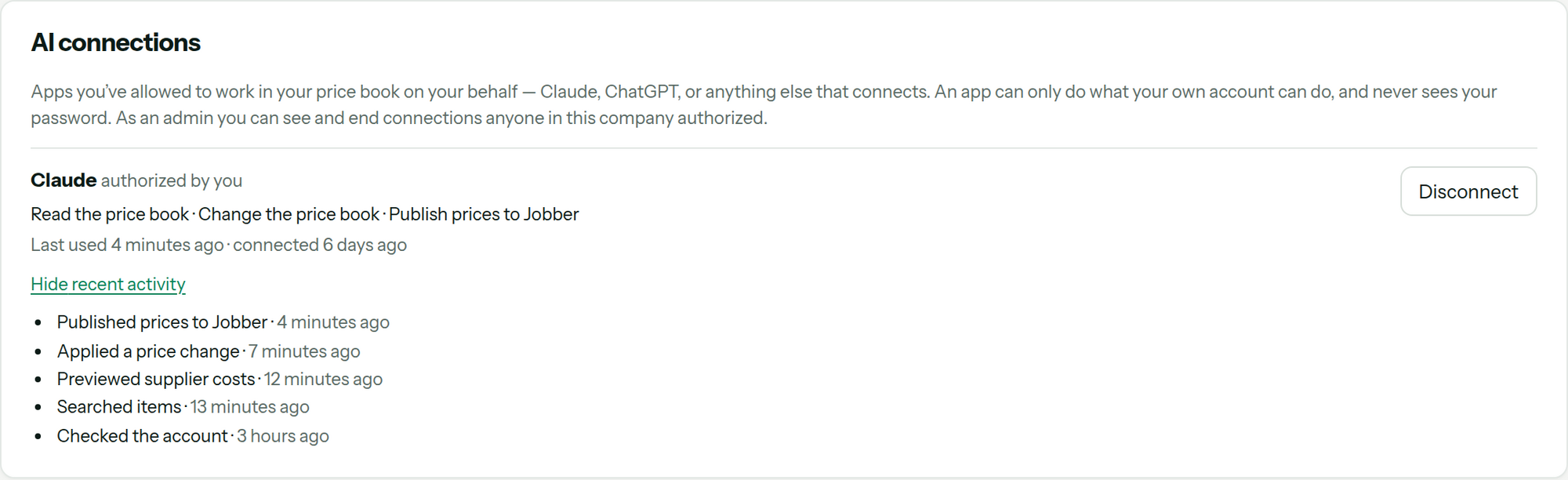
Disconnect ends it at once — the app stops being able to read or change anything straight away. It does not undo what the app already did. Those changes stay, and you'll find them in History, marked as made by that app rather than by you.
As an admin you see and can end every connection anyone in your company authorized, not only your own. The card shows the most recent calls rather than all of them; History is the complete record.
When something goes wrong
- It only offers to sign you up, and you already have an account. The connector was added without signing in, so it reached Pricebookr as a stranger — it can start a new account and nothing else. Nothing is wrong with your account. Remove the connector and add it again, choosing the option that signs in; some assistants only offer that choice when a connector is first added, which is why editing it in place may not help. There is no setting inside Pricebookr that fixes this — it is fixed where you added it.
- "Connecting an app is an admin's decision." You're signed in as a sales or field user. An admin has to make the connection.
- The assistant says it can't reach something. Read the sentence it quotes — it names what was refused. Billing, team, payouts, account settings and customer records are out of reach on purpose, and rephrasing the request won't get to them.
- It can't see your costs. Cost is hidden from a connection whenever it's hidden from the account that authorized it. Check that person's sees cost setting on the Members tab.
- The connection stopped working on its own. Changing your password or your email address ends every connection you authorized — each one was approved with the credential you just replaced. Connect again.
- It says the account needs a plan. Either the trial has ended, or you asked it to publish to Jobber while on a trial. Subscribe under Settings → Billing; see Billing and trials.
FAQ
Can an AI assistant change my prices without asking me?
No. A price change is worked out and shown to you first, and applied only when you tell it to go ahead — and what gets applied is the version you were shown, not a fresh calculation. Publishing to Jobber is a separate permission and a separate confirmation on top of that.
Does connecting an assistant hand my catalog to the AI company?
Whatever you ask about is sent to your assistant so it can answer you, the same as if you had pasted it into the chat yourself; how that provider handles it is between you and them. Pricebookr sends nothing on its own — it answers the questions your assistant asks while the connection exists, and stops the moment you disconnect.
Why can my assistant only offer to sign me up, when I already have an account?
Because the connector was added without signing in. An assistant that reaches Pricebookr with no credential is a stranger to it, so the only thing it can offer is starting a new account — it cannot see the catalog you already have, and it never will until the connector is added again with the sign-in option chosen. This is the one mistake worth checking first.
Can my techs connect their own assistants?
Only an admin can make a connection. A connection acts with the permissions of whoever authorized it, so an admin connecting one is deciding what that app may do in your company.
Does this cost extra?
No. Connecting an assistant is included, and so is everything it can do in your price book. Publishing to Jobber needs a paid plan, the same as it does in the web app.
What happens to my connections if I delete my organization?
They go with it. See Delete your organization.