Three roles — admin, office and field — with techs limited to the jobs assigned to them. Who can see costs, which price books each person can see or edit, and what techs see about the money on a job are separate settings. Every plan includes one user; each extra user is $19 a month.
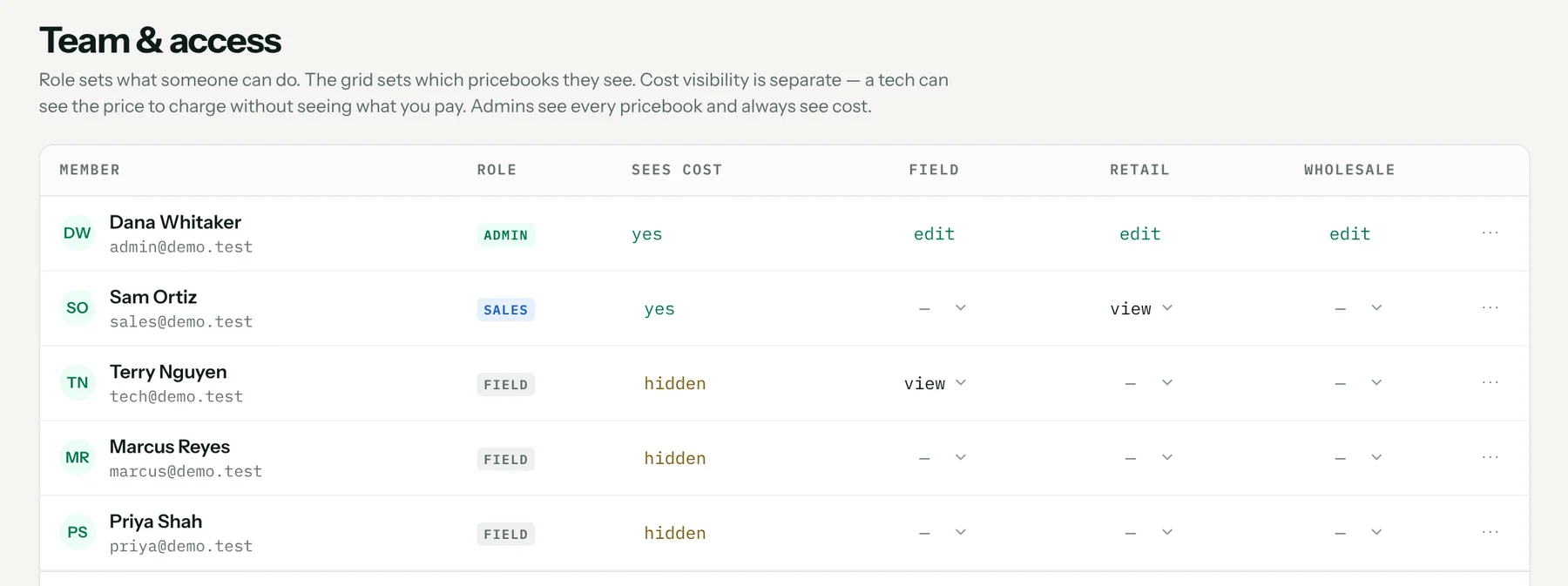
Three roles
Admins run the account: settings, billing, the team, and every price book. Office users quote, schedule and invoice. Field techs see and work only the jobs assigned to them, and use the catalog read-only.
Costs stay with the people who need them
Each person has a cost setting. Turn it off and they see only the price to charge — no unit cost, markup or margin. Field techs start with it off; admins always see cost. What techs see about the money on a job is a separate setting.
Price book by price book
Grant each person view or edit access to each price book — the field list for techs, wholesale for the office. Starter includes the main price book plus one more; Pro has unlimited price books.
Who changed what
Every change is logged with who made it. CSV imports and exports, the Jobber connection and sync, catalog rollback and the audit log are admin-only. An AI assistant you connect acts as you, with your role and your access.
What it costs
Included on both plans: Starter $49 a month and Pro $89, each with one user included and $19 a month per extra user. Every plan starts with a 14-day free trial. Full pricing.
Start your 14-day free trial →
FAQ
Can a tech see what parts cost us?
Only if you allow it. Field techs start with cost hidden and see the price to charge.
Can techs see every job?
No. Field techs see and work only the jobs assigned to them.
How do I add someone?
Invite them by email from the Members tab and pick their role. The invitation link is good for seven days.
What does an extra user cost?
Every plan includes one user, and each additional user is $19 a month. Customers who approve quotes or pay invoices are not users.
How to set it up
Related: The field app for iPhone and Android · Customer records and import · Time tracking · Everything the HVAC CRM does