Techs clock time against jobs, and the Book vs clock report compares hours worked with hours sold — so you see which flat-rate tasks are underpriced. On Pro, techs also clock in and out for the day with breaks, and the office exports timesheets for payroll.
Book vs clock (every plan)
Every flat-rate task was sold for a number of hours. Book vs clock puts the hours your techs actually spent next to it, task by task.
Payroll time tracking (Pro)
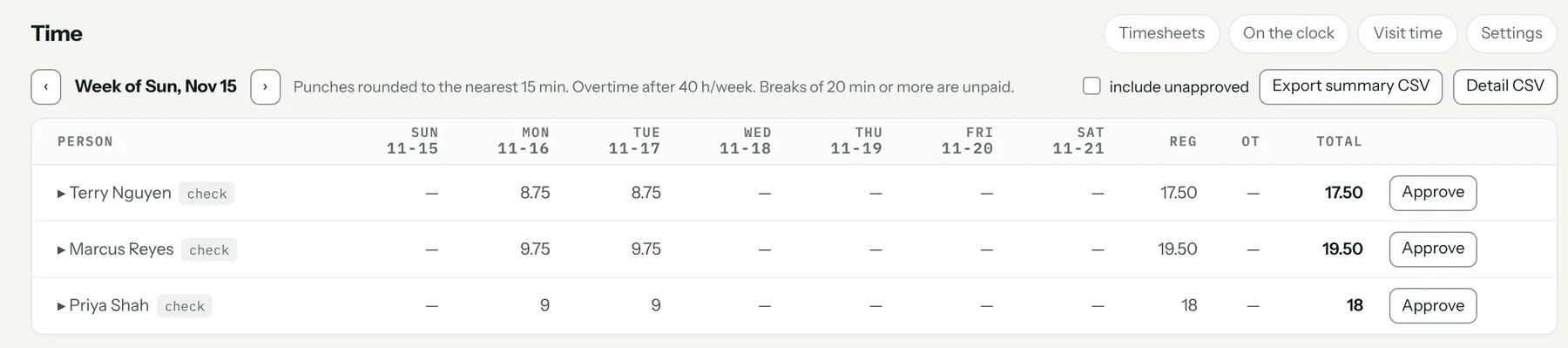
Shifts and breaks from the phone, optionally only when the tech is at an allowed location. Timesheets show overtime; shifts left open too long are flagged for review, never closed for the tech. Admins approve weekly timesheets and export a CSV for the payroll provider.
Visit timers (Pro, optional)
Optional geofenced visit timers record arrival and departure at a job, with the office reviewing anything unusual.
Get the app
What it costs
Job clocks and the Book vs clock report are on both plans. Payroll time tracking is on Pro, $89 a month. Every plan starts with a 14-day free trial. Full pricing.
Start your 14-day free trial →
FAQ
Does Pricebookr run payroll?
No. It records shifts, breaks and overtime and exports a CSV for your payroll provider.
Is clock-in tied to location?
Optionally. On Pro you can require techs to be at the shop or a job to clock in.
How to set it up
Related: Reports · The field app for iPhone and Android · Good / better / best quotes · Everything the HVAC CRM does