A markup schedule sets a markup (or margin) for each range of item cost, then applies it across your catalog. Enter either markup or margin and Pricebookr fills in the other — they're two views of the same number. Need a one-off conversion? Use the free margin & markup calculator.
Setting it up
- On the Markups tab, pick the pricebook to price.
- Define cost bands (e.g. $0–10, $10–50, $50–150…) and a markup for each. Add or remove bands as needed.
- Click Preview on catalog to see exactly which items change and to what, then Apply to catalog.
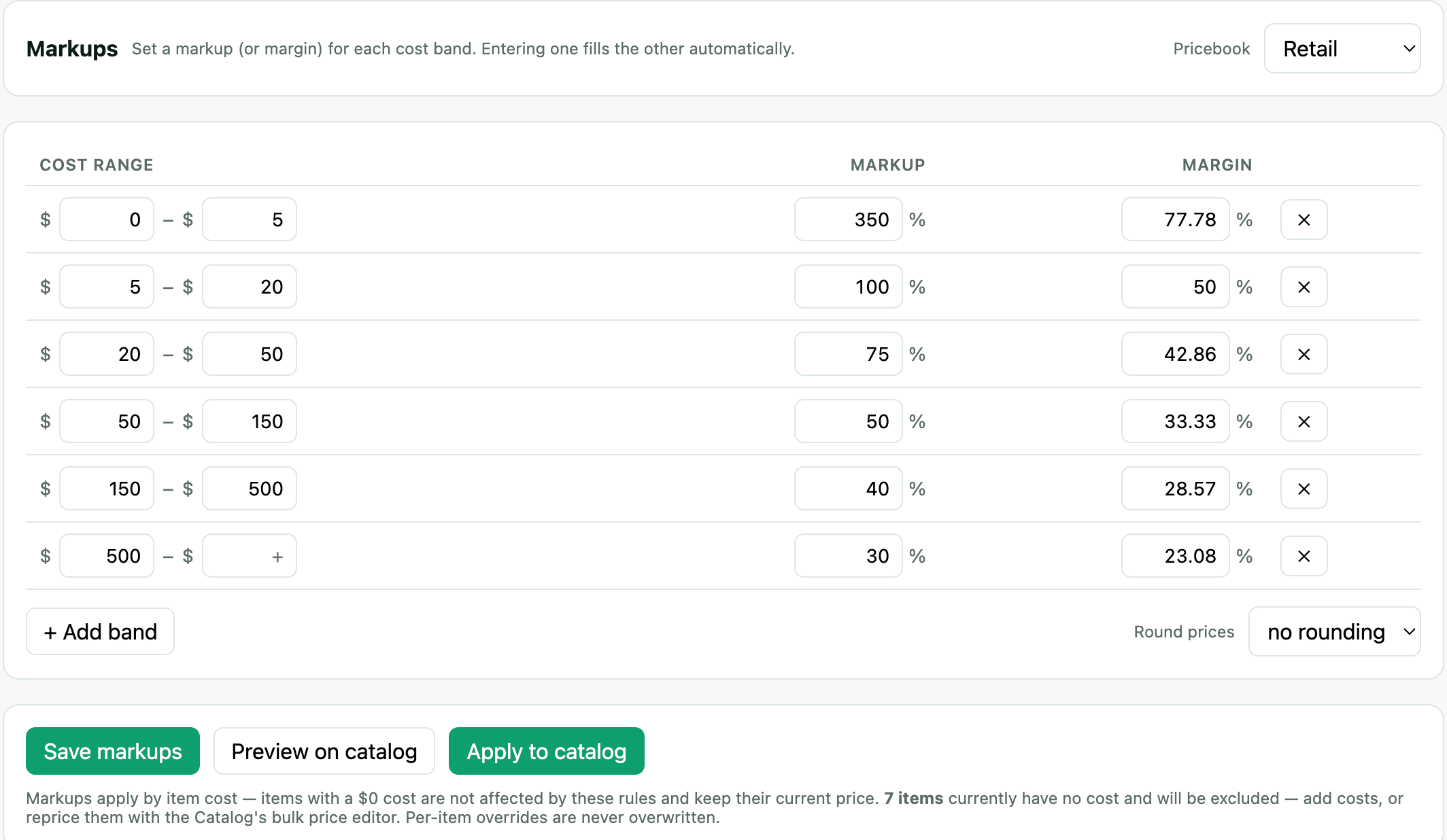
Bands read total cost
An item's cost is material cost + labor cost, and a band matches on the total. A task with $80 of parts and $45 of labor lands in whichever band covers $125. Splitting an item's cost into its two parts never changes which band it falls into or what it prices at — the split is there so you can see and update the parts separately, not to change the arithmetic.
Items with no cost are skipped
A markup schedule prices from cost, so an item with no cost — nothing in material and nothing in labor — has nothing to mark up. Rather than pricing those items at $0.00 and destroying a real price, Pricebookr leaves them exactly as they are and reports how many it skipped — in the note under the buttons, in the preview, and in the applied message.
This is the normal state of a catalog imported from Jobber, where services often carry a price but no cost. Two ways forward, and most catalogs use both:
- Add costs where you know them — inline on the Catalog, or with Bulk edit → cost. The No cost data filter above the catalog shows exactly which items still need one.
- Price them directly with Bulk edit → price, which applies a percent change, an amount, or a fixed price without needing any cost at all.
"Applied markups to 0 items" almost always means every item was excluded for having no cost — not that your bands are wrong. The skipped count in the same message tells you which case you are in.
How each price is governed
Every price on the Catalog carries a badge saying where it came from, which is what decides whether a schedule run will touch it:
| Badge | Meaning |
|---|---|
| manual | A person set this number — typed in, bulk price-edited, or imported from Jobber. Nothing recalculates it. |
| a percentage, e.g. 40% | Per-item markup override — the badge shows that item's own markup. Priced from cost at that markup, so it follows cost changes; schedule runs leave it alone. |
| auto | Governed by this pricebook's schedule, so it follows cost changes. |
To move a manual price onto the schedule, click its manual badge for one item, or use Manual → schedule… on the Catalog for many at once. The single-item dialog shows the arithmetic before you commit; the bulk version previews the whole set. Items with no cost, and items no band covers, are skipped and keep their manual price — converting them would delete the only price they have.
When the preview says nothing would change
There are two very different reasons a preview finds nothing to do, and the message tells you which one you are in.
Your prices already match the schedule. Nothing to do, and nothing is wrong.
Or every item is hand-set. A catalog loaded from a starter template, or imported from a CSV as "our prices", is entirely manual — and a schedule is never allowed to overwrite a price a person set. The preview says so, gives the count and names the first few, and offers Put these on the schedule… right there. That stages the whole conversion: you see every old price and new price before anything is written, items with no cost and items no band covers are listed as keeping their current price, and a catalog snapshot is taken before it applies.
A preview that does change some items but leaves others out tells you that too — it names the hand-set ones that were skipped, so nothing about the apply is a surprise afterwards.
Per-item overrides
Need one item priced differently? Edit it and set a markup, margin, or exact price for that pricebook. Overrides are respected by future schedule runs — they won't be overwritten.