To reconcile card payouts in QuickBooks Online, record each customer payment at its full amount into Undeposited Funds, then record one bank deposit per payout that groups those payments and carries the processing fee as a negative line. The deposit then equals the amount that reached the bank, so the bank feed matches it in one click, the invoices show paid in full and the fee lands in an expense account. The steps, a worked example and the three usual causes of a mismatch are below.
Why doesn't a card payout match your invoices in QuickBooks Online?
A card payout does not match any invoice because it is not one payment. The processor groups the card payments that became available, subtracts its fees and any refunds, and sends one net amount to the bank. Three invoices go in and one smaller number comes out.
Stripe describes its daily schedule this way: it "automatically transfers your available funds every business day." Available funds are whatever has settled, so one payout usually covers several jobs. Here is one day for a small HVAC shop, using Stripe's published US card rate of 2.9% plus 30 cents per successful charge (stripe.com/pricing). The jobs are an illustration, not data from a real shop.
| Invoice | Customer paid | Card fee (2.9% + $0.30) | Net to the shop |
|---|---|---|---|
| Diagnostic call | $189.00 | $5.78 | $183.22 |
| Condenser fan motor repair | $642.00 | $18.92 | $623.08 |
| Deposit on a system replacement | $2,400.00 | $69.90 | $2,330.10 |
| Payout that reaches the bank | $3,231.00 | $94.60 | $3,136.40 |
The bank feed shows one line for $3,136.40. QuickBooks has three payments that add up to $3,231.00. Nothing matches until the books say where the missing $94.60 went.
What is Undeposited Funds, and why use it for card payments?
Undeposited Funds is a holding account in QuickBooks Online for money a customer has paid that has not reached the bank yet. It exists for exactly this case: several payments that arrive at the bank as one deposit. Each payment waits there at its full amount until you record the deposit that contains it.
Used correctly, the balance of Undeposited Funds always equals the card payments the processor has not paid out yet. That makes it a useful check. If it holds payments from two months ago, a payout was booked some other way and those payments were never cleared.
How do you record a card payout in QuickBooks Online, step by step?
Record the payments first, then the deposit. These steps follow Intuit's help article Enter a bank service fee while using a third-party merchant service (updated August 2026), with the numbers from the example above.
- For each card payment, select + Create, then Receive Payments. Tick the invoice, enter the full amount the customer paid, and set the deposit-to account to Undeposited Funds. Save.
- When the payout reaches the bank, select + Create, then Bank Deposit, and choose the bank account the processor pays into.
- Under Select Existing Payments, tick the payments that payout contains: $189.00, $642.00 and $2,400.00.
- Under Add other funds to this deposit, add one line with your merchant fees expense account and the fee as a negative amount: -$94.60.
- Check that the deposit total reads $3,136.40, the same as the bank line, and date it the day the money arrived. Save.
- In the bank feed, match the $3,136.40 line to the deposit you just recorded. Do not add it as new income.
The list of which payments are inside a payout comes from the processor, not from QuickBooks. Stripe's payout reconciliation report exists to match each bank payout to the transactions in it, and it downloads as a CSV with the gross, fee and net of every row.
Which way of booking card payouts keeps the books right?
Only the Undeposited Funds method keeps income, fees and the bank balance all correct. The two common shortcuts each get the bank balance right and something else wrong. This table shows what each method does to the $3,136.40 payout above.
| Method | Income recorded | Fees recorded | What goes wrong |
|---|---|---|---|
| Add the bank line as a new deposit to income | $3,136.40 from the deposit, plus $3,231.00 already on the invoices | $0 | Income is counted twice and the three invoices stay open |
| Receive each payment at its net amount | $3,231.00 | $0 | Each invoice is left short, $94.60 in total, and customers who paid in full show a balance |
| Receive payments straight into the bank account at full amount | $3,231.00 | $0 | The books show three deposits totaling $94.60 more than the bank received, and none match the feed |
| Undeposited Funds, then one deposit with a negative fee line | $3,231.00 | $94.60 | Nothing. The deposit equals the bank line. |
The fee line matters beyond tidiness. At 2.9% plus 30 cents, a shop that takes $300,000 a year by card on an average ticket of $600 pays $8,850 in card fees. That is overhead, and it belongs in your rate; see how to calculate overhead for contractors. Whether to move larger jobs to bank transfer is covered in how to get paid faster as an HVAC contractor, and financing fees are a separate cost, covered in contractor financing fees.
What do refunds and timing do to a payout?
Refunds reduce a later payout, and timing moves payments into a different payout than you expect. Both are normal, and both are the usual reason a deposit will not tie out.
| What happened | Effect on the payout | How to book it |
|---|---|---|
| A $189.00 refund is issued the same day an $850.00 payment (fee $24.95) settles | $850.00 - $24.95 - $189.00 = $636.05 | Record the refund in QuickBooks, then include it in the deposit with the payment and the fee line |
| A payment taken Friday, October 30 is paid out the following week | The October payment sits in a November deposit | Leave it in Undeposited Funds at month end. The income is still October's. |
| A new processing account takes its first payment | Stripe says it typically schedules the initial payout to complete within 7 to 14 days | Expect Undeposited Funds to hold those payments until then |
| Refunds exceed new payments on a slow day | The balance goes negative and Stripe can debit the bank account | Record it as a withdrawal that clears the refunds, not as an expense |
The schedule itself is your choice. Stripe offers daily, weekly, monthly and manual payouts, and a payout that falls on a weekend or holiday arrives the next business day. A weekly payout means fewer deposits to book and more payments inside each one.
How often should a small shop reconcile card payouts?
Reconcile card payouts weekly, and the bank account itself every month against the statement. A week of payouts for a one- or two-truck shop is at most five deposits, which is small enough to finish in one sitting and recent enough that you still remember the odd one.
- Open the bank feed and count the processor deposits for the week.
- For each one, confirm a bank deposit exists in QuickBooks for the same amount and match it.
- Open Undeposited Funds. Every payment still in it should be newer than your last payout.
- Check that merchant fees for the week are roughly 3% of card sales. Far less means a fee line was skipped.
If you track job profit, post the fee to overhead rather than to the job. Job costing for contractors covers what belongs on the job and what does not.
How do you reconcile payouts with Pricebookr?
In Pricebookr, the steps above happen on their own once QuickBooks Online is connected. The QuickBooks Online sync page covers what is included; the setup is:
- An admin opens CRM, then QuickBooks, clicks Connect QuickBooks and picks the company at Intuit.
- Under Sync settings, Accounts, choose three accounts: where sales post, which bank account payouts deposit into, and where fees are booked.
- Issue invoices and take payments as usual. An issued invoice posts as an invoice, and each card, bank, cash or check payment posts as a payment into Undeposited Funds.
- When a Stripe payout lands, it posts as one bank deposit that clears those payments out of Undeposited Funds, with Stripe's fee and Pricebookr's fee as separate lines. Card payments carry no Pricebookr fee.
- Match the deposit to the bank feed in QuickBooks. Sync activity lists every record sent and its status.
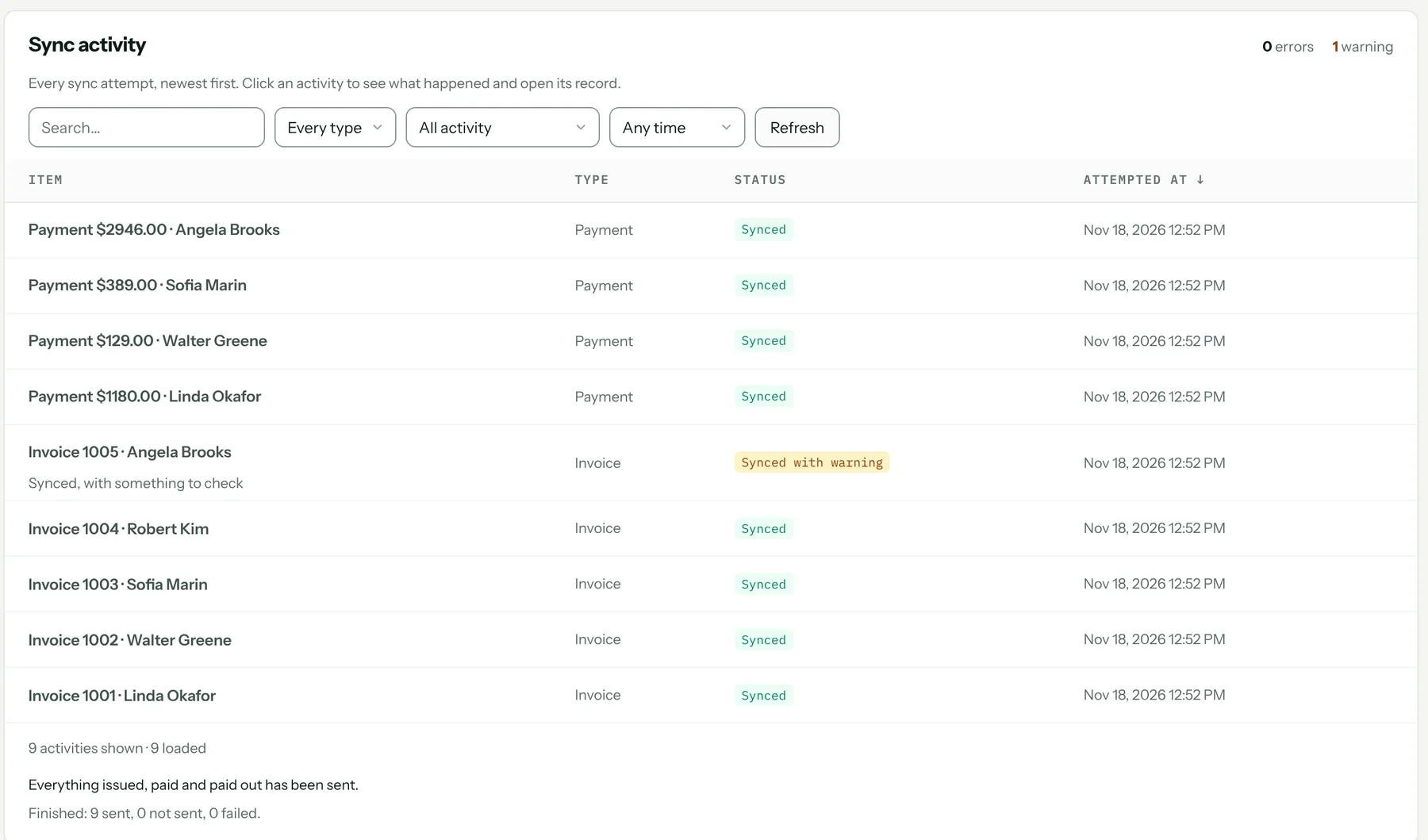
Without QuickBooks, the Payouts tab still lists each transfer Stripe sent to your bank with the payments, refunds and fees inside it, which is the list step 3 of the manual method needs. Send all sends records from before you connected, oldest first. A payout that contains money Pricebookr never saw, such as a charge taken directly in Stripe, is not posted; you record that one by hand.
What it needs: QuickBooks Online Simple Start, Essentials, Plus or Advanced in US dollars, and one QuickBooks company per account. QuickBooks Desktop is not supported. The sync is included on Starter at $49 a month. Full steps are in the help doc, Connect QuickBooks Online, and payments are covered on the invoicing and payments page.
FAQ
Why is my Stripe deposit less than my invoice total in QuickBooks?
The deposit is less because the processor subtracts its fee before paying out. At Stripe's published US rate of 2.9% plus 30 cents, a $642.00 card payment arrives as $623.08. Record the payment at $642.00, then add the $18.92 fee as a negative line on the bank deposit so the deposit equals what the bank received.
Should card processing fees be recorded as an expense or as a discount?
Record card processing fees as an expense, in an account such as merchant fees or bank charges. Intuit's own steps put the fee on the bank deposit as a negative amount against the expense account you use for bank fees. A discount would lower your income and hide what card acceptance costs the business each year.
What account do customer card payments go to before the payout arrives?
Customer card payments go to Undeposited Funds until the payout arrives. It is a holding account for money that has been paid but has not reached the bank. When you record the bank deposit for the payout, the payments in it leave Undeposited Funds and the net amount lands in the bank account.
How do I find which payments are in a payout?
Get the list from the processor. In Stripe, open the payout in the Dashboard or download the payout reconciliation report, which lists each charge, refund and fee with its gross, fee and net amount. Tick exactly those payments on the QuickBooks bank deposit, and the total will equal the bank line.
How do I fix payouts that were already added as income?
Undo the bank feed entry so the line returns to the review list, receive each payment against its invoice into Undeposited Funds, record one bank deposit with the fee as a negative line, then match the bank line to that deposit. If the period is already closed or filed, ask your bookkeeper or accountant before changing it.